7.4 Building database applications with Python and PostgreSQL
Working with PostgreSQL and Python
Python has several modules to work with a PostgreSQL database. The most popular is psycopg2.
Advantages of psycopg2: - Most popular and stable module - Actively maintained, supports Python 2.x and 3.x - Thread-safe, designed for multi-threaded applications
Installation:
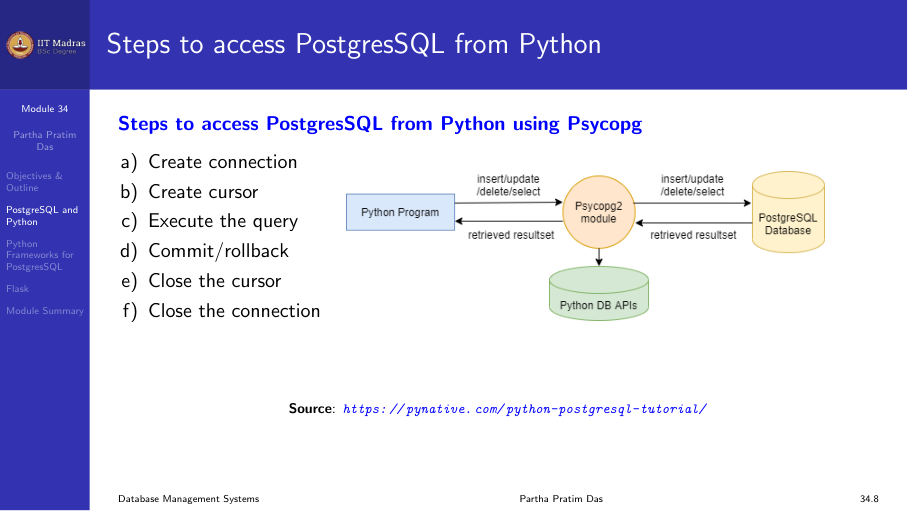
pip install psycopg2Steps to access PostgreSQL from Python
The workflow follows a standard pattern:
- Create a connection.
- Create a cursor.
- Execute SQL queries.
- Commit or rollback changes.
- Close the cursor.
- Close the connection.
Connection and cursor APIs
Connection
import psycopg2

def connectDb(dbname, user, password, host, port):
    conn = None
    try:
        conn = psycopg2.connect(
            database=dbname,
            user=user,
            password=password,
            host=host,
            port=port
        )
        print("Connected")
    except Exception as e:
        print(f"Error: {e}")
    finally:
        if conn:
            conn.close()
Cursor
Once connected, create a cursor to execute queries:
cur = conn.cursor()Execute
Execute SQL with optional parameterized placeholders:
cur.execute("INSERT INTO table VALUES (%s, %s)", (val1, val2))Fetch results
cursor.fetchone()— returns the next row.cursor.fetchmany(size)— returnssizerows as a list.cursor.fetchall()— returns all remaining rows as a list.cursor.rowcount— read-only attribute returning the number of rows modified, inserted, or deleted.
Commit and rollback
conn.commit()     # make changes permanent
conn.rollback()   # undo changes since last commit
Examples
CREATE table
def createTable():
    conn = None
    try:
        conn = psycopg2.connect(database="testdb", user="postgres",
                                password="pass", host="127.0.0.1", port="5432")
        cur = conn.cursor()
        cur.execute('''
            CREATE TABLE candidate (
                email_id  VARCHAR(255) PRIMARY KEY,
                first_name VARCHAR(100),
                last_name  VARCHAR(100)
            )
        ''')
        conn.commit()
        print("Table created successfully")
        cur.close()
    except Exception as e:
        print(f"Error: {e}")
    finally:
        if conn:
            conn.close()
INSERT
def insertRecord(num, name):
    conn = None
    try:
        conn = psycopg2.connect(database="testdb", user="postgres",
                                password="pass", host="127.0.0.1", port="5432")
        cur = conn.cursor()
        cur.execute(
            "INSERT INTO candidate (num, name) VALUES (%s, %s)",
            (num, name)
        )
        conn.commit()
        print("Record inserted successfully")
        cur.close()
    except Exception as e:
        print(f"Error: {e}")
    finally:
        if conn:
            conn.close()
DELETE
def deleteRecord(num):
    conn = None
    try:
        conn = psycopg2.connect(database="testdb", user="postgres",
                                password="pass", host="127.0.0.1", port="5432")
        cur = conn.cursor()
        cur.execute("DELETE FROM candidate WHERE num = %s", (num,))
        conn.commit()
        print(f"{cur.rowcount} row(s) deleted")
        cur.close()
    except Exception as e:
        print(f"Error: {e}")
    finally:
        if conn:
            conn.close()
UPDATE
def updateRecord(num, name):
    conn = None
    try:
        conn = psycopg2.connect(database="testdb", user="postgres",
                                password="pass", host="127.0.0.1", port="5432")
        cur = conn.cursor()
        cur.execute(
            "UPDATE candidate SET name = %s WHERE num = %s",
            (name, num)
        )
        conn.commit()
        print(f"{cur.rowcount} row(s) updated")
        cur.close()
    except Exception as e:
        print(f"Error: {e}")
    finally:
        if conn:
            conn.close()
SELECT
def selectAll():
    conn = None
    try:
        conn = psycopg2.connect(database="testdb", user="postgres",
                                password="pass", host="127.0.0.1", port="5432")
        cur = conn.cursor()
        cur.execute("SELECT * FROM candidate")
        rows = cur.fetchall()
        for row in rows:
            print(f"{row[0]} {row[1]} {row[2]}")
        cur.close()
    except Exception as e:
        print(f"Error: {e}")
    finally:
        if conn:
            conn.close()
Flask web framework
Flask is a lightweight WSGI micro-framework for Python. It provides a convenient way to build web applications that connect to a database.
Installation
pip install FlaskSimple example
from flask import Flask
app = Flask(__name__)

@app.route("/")
def hello_world():
    return "<p>Hello, World!</p>"

if __name__ == "__main__":
    app.run(host="127.0.0.1", port=5000)
A complete application with PostgreSQL
Consider the candidate table in PostgreSQL. The application provides: - A home page with links to add and view emails. - A form to add a new candidate. - A page to view all candidates.
index.html:
<!DOCTYPE html>
<html>
<head><title>Candidate Email</title></head>
<body>
    <h1>Candidate Email Database</h1>
    <a href="/add">Add Email</a><br>
    <a href="/viewall">View Email</a>
</body>
</html>
Python application:
from flask import Flask, request, render_template
import psycopg2

app = Flask(__name__)

def get_connection():
    return psycopg2.connect(database="testdb", user="postgres",
                            password="pass", host="127.0.0.1", port="5432")

@app.route("/")
def index():
    return render_template("index.html")

@app.route("/add")
def add():
    return render_template("add.html")

@app.route("/savedetails", methods=["POST"])
def saveDetails():
    conn = get_connection()
    cur = conn.cursor()
    email = request.form["email"]
    first_name = request.form["first_name"]
    last_name = request.form["last_name"]
    cur.execute(
        "INSERT INTO candidate (email_id, first_name, last_name) VALUES (%s, %s, %s)",
        (email, first_name, last_name)
    )
    conn.commit()
    cur.close()
    conn.close()
    return "Record saved successfully"

@app.route("/viewall")
def viewAll():
    conn = get_connection()
    cur = conn.cursor()
    cur.execute("SELECT * FROM candidate")
    results = cur.fetchall()
    cur.close()
    conn.close()
    return render_template("viewall.html", rows=results)

if __name__ == "__main__":
    app.run(host="127.0.0.1", port=5000, debug=True)
add.html:
<!DOCTYPE html>
<html>
<body>
    <h1>Add Email Information</h1>
    <form action="/savedetails" method="post">
        <table>
            <tr><td>Email ID:</td><td><input type="text" name="email"></td></tr>
            <tr><td>First Name:</td><td><input type="text" name="first_name"></td></tr>
            <tr><td>Last Name:</td><td><input type="text" name="last_name"></td></tr>
            <tr><td colspan="2"><input type="submit" value="Submit"></td></tr>
        </table>
    </form>
</body>
</html>
viewall.html:
<!DOCTYPE html>
<html>
<body>
    <h1>Email List</h1>
    <table border="1">
        <tr><th>Email ID</th><th>First Name</th><th>Last Name</th></tr>
        {% for row in rows %}
        <tr>
            <td>{{ row[0] }}</td>
            <td>{{ row[1] }}</td>
            <td>{{ row[2] }}</td>
        </tr>
        {% endfor %}
    </table>
    <br><a href="/">Go Home</a>
</body>
</html>
Summary
- psycopg2 is the standard Python module for accessing PostgreSQL.
- The workflow is: connect → cursor → execute → commit/rollback → close.
- Flask is a lightweight framework for building web applications with database connectivity.
- Flask handles routing, templates, and HTTP methods, so you can focus on the application logic and database access.