2.4 Intro to SQL/2
This section will cover all the remaining basic operations.
Cartesian Product
The Cartesian Product is a combination of all the tuples that the Instructor and the Teacher has. In this operation we are trying to relate the information on both the tables. Ex : We can get the list of courses an instructor is teaching, which is neither available in both the tables, but from the combination.
Rename AS Operation
This is used when we need to change the name of an attribute or a relation.
The problems that will occur are : 1. we are trying to do instructor cross instructor, but before we were doing with different tables. 2. If we want to do an operation within an instance / table , it is difficult to clearly mention the table as both have same names.
So, we can just rename the tables using “AS” key. In the below code, we are doing cartesian product within itself.
select  distinct  T.name
from instructor as T, instructor as S,
where T.salary > S.salary and S.dept_name = 'Comp_Sci'
This code is used to compare the salary of the instructors whose salary is greater than salary of the instructors in the Computer Science.
Cartesian Product example. 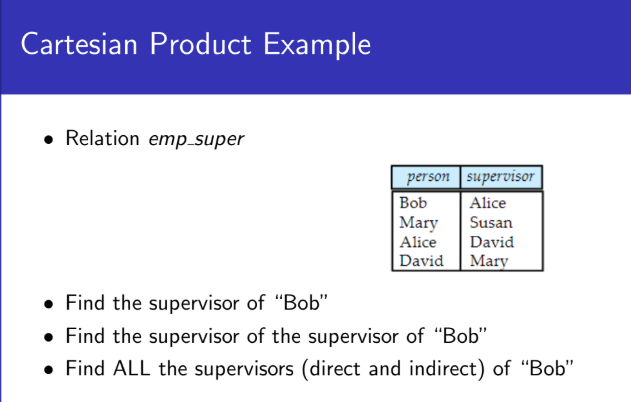
String Operations
In some cases, there are some strings that we know partially and we want to find and look for that string. For this we have a LIKE operator. %% is used to do string matching.
select name
from instructor
where name like '%dar%'
Ex : dar, sardar , majumdar will match for %dar
We can specify all the # of characters using underscore. Ex : %dar_ _ _ , this specifies the number of characters after the string.
When it comes to string matching it is case sensitive.
Also, SQL supports various operations like concatenation, converting from upper case to lower case, finding string length, extracting substrings, etc.
Ordering the Tuples
In SQL when query results are displayed they are displayed in a lexical order. We use the clause order by
select distinct name
from instructor
order by name
By default the order by is used to display the result in ascending order in default. We can also sort using multiple attributes.
Selecting Number of Tuples in Output
The select top is used to make it easier to view the tables and convenient.
select top 10 distinct name
from instructor
- Different SQL Servers use different conventions for the SELECT TOP Clause.
- SQL Server & MS Access supports
select top - MySQL supports the limit clause.
- Oracle uses the
fetch first n rows onlyandrownum
- SQL Server & MS Access supports
WHERE Clause Predicates
SQL includes a between comparison operator. This can be used when there is a range to compare.
select name
from instructor
where salary between 90000 and 100000- Tuple comparison
select name, course_id
from instructor , teaches
where (instructor.ID, dept_name) = (teaches.ID, 'Biology');
In Operator
The in operator is used to simplify the predicate in the where clause. It is used to specify multiple values to be compared like in set membership.
select name
from instructor
where dept_name in ('Comp. Sci','Biology')
Duplicates
NOTE : In relational algebra no duplicates are allowed, in SQL duplicates are allowed.
Multi-set : We can have multiple elements which are identical and therefore, we can multiset operations.